Go-powered · Open Source & Free

PicoClaw

An ultra-lightweight personal AI assistant. With under 10MB of memory usage, sub-second startup, and multi-architecture support, it makes AI accessible on everything from $10 hardware to high-performance servers.
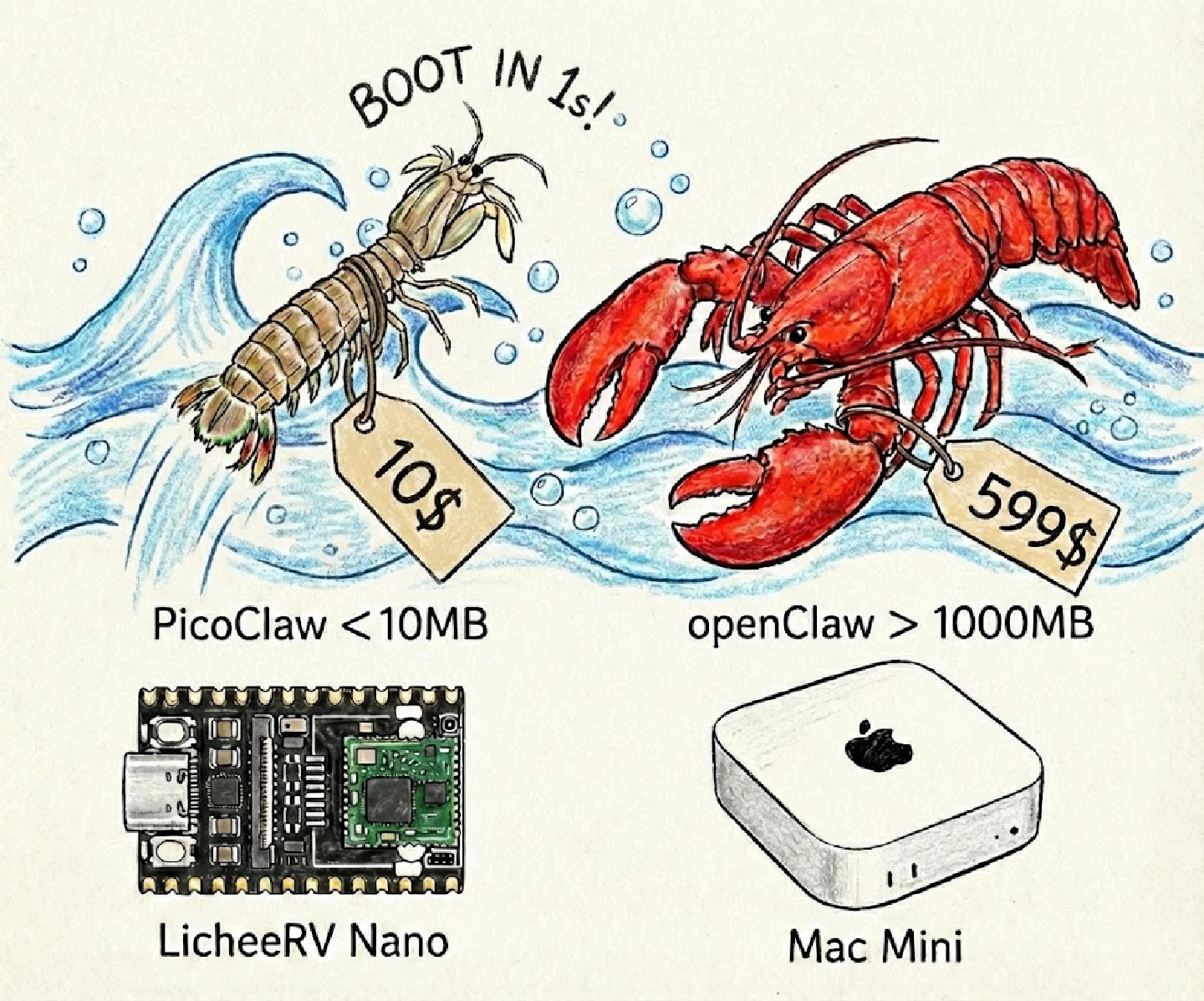
PicoClaw System Preview
System Preview
<10MB
Memory Usage
<1s
Startup Time
3
Supported Architectures
95%
AI-Generated Code

Extreme Performance, Infinite Possibilities

Rewritten in Go for a 10x performance boost. From Raspberry Pi to servers, from Telegram to DingTalk, run your AI assistant anywhere.

Ultra-Low Resource Footprint

Uses less than 10MB of RAM—99% less than similar products. Runs smoothly even on $10 hardware, making AI assistance truly accessible.

Lightning-Fast Startup

Starts in under 1 second, even on a single-core 0.6GHz processor. Say goodbye to long waits and start your AI conversations instantly.

Multi-Architecture Support

Supports x86_64, ARM64, and RISC-V architectures. Deploy everywhere with one click—from Raspberry Pi to servers, and embedded devices to the cloud.

Multi-Platform Integration

Supports Telegram, Discord, QQ, DingTalk, and more. Launch the gateway with a single command and integrate your AI assistant into your daily workflow.

Smart Scheduled Tasks

Built-in cron functionality supports one-time reminders, recurring tasks, and standard cron expressions. Automate your daily work and free up your time.

Multi-Model Support

Supports various LLM providers including OpenRouter, Zhipu AI, Anthropic, OpenAI, DeepSeek, and Groq. Switch freely to find the AI that fits your needs best.

PicoClaw vs. Others: Performance Comparison

Rewritten in Go, delivering 10x performance gains

Data Privacy

    Cloud AI
    Stored on Servers
    PicoClaw
    100% Local

Cost

    Cloud AI
    $20+/month
    PicoClaw
    Free after setup

Device Support

    Cloud AI
    Web only
    PicoClaw
    Mac/RPi/Docker

Built for Real-World Applications

From personal productivity to professional workflows, PicoClaw adapts to your needs.

Code Assistant

Local code completion, debugging, and documentation generation. Keep your proprietary code private while getting AI assistance.

Content Creation

Write blog posts, emails, and documents with AI assistance. All your drafts and ideas stay on your device.

Data Analysis

Analyze sensitive business data locally. No data leaves your infrastructure, ensuring complete confidentiality.

Personal Assistant

Manage your calendar, emails, and tasks with voice commands and automation. 100+ integrations available.

Research & Learning

Summarize papers, answer questions, and organize knowledge bases. Perfect for students and researchers.

API Integration

Build custom applications with PicoClaw's REST API. Integrate AI capabilities into your existing workflows.

One-Click Install, Instant Launch

A single binary file with no complex configuration required. Supports Windows, macOS, Linux, and more.

bash — Quick Install
git clone https://github.com/sipeed/picoclaw && cd picoclaw && picoclaw onboard

System Requirements

Linux / macOS / Windows
Supports x86_64 / ARM64 / RISC-V
RAM ≥ 64MB (512MB recommended)
LLM API Key (Optional)

Core Features

Interactive Chat
Multi-Platform Bot Integration
Smart Scheduled Task Management
Long-term Memory & Skills System

Quick Start in Three Steps

Clone the repository

git clone https://github.com/sipeed/picoclaw.git

Initialize configuration

cd picoclaw && picoclaw onboard

Follow the prompts to configure your LLM API key and preferences.

Start chatting

picoclaw agent # Or send a single message: picoclaw agent -m "Hello, introduce yourself"

Supports both interactive chat and single-query modes.

macOS
Linux
Windows (WSL2)
Raspberry Pi
Docker

FAQ

What is PicoClaw?

PicoClaw is an ultra-lightweight personal AI assistant developed in Go, inspired by the NanoBot project. It features extremely low resource usage (under 10MB of RAM), supports multi-architecture deployment, and integrates with various messaging platforms. 95% of the core code is automatically generated by AI agents and continuously optimized through human-in-the-loop feedback.

What are the advantages of PicoClaw compared to other solutions?

Compared to OpenClaw (TypeScript) and NanoBot (Python), PicoClaw reduces memory usage by 99% (from 100MB+ down to 10MB) and shortens startup time from 30 seconds to under 1 second. It also supports the RISC-V architecture, allowing it to run on hardware as cheap as $10, significantly lowering the barrier to entry.

Which messaging platforms are supported?

PicoClaw supports multiple mainstream messaging platforms including Telegram, Discord, QQ, and DingTalk. Simply run the `picoclaw gateway` command to start the gateway service, configure the respective bot tokens, and use your AI assistant on these platforms.

What are the hardware requirements?

PicoClaw has minimal hardware requirements; it is recommended to have 64MB+ of RAM (10MB minimum). It supports x86_64, ARM64, and RISC-V architectures and can run on Raspberry Pi, embedded devices, Mac, Linux, and Windows.

Which LLM providers are supported?

PicoClaw supports multiple mainstream LLM providers, including OpenRouter, Zhipu AI, Anthropic, OpenAI, DeepSeek, Groq, and more. You can switch models freely based on your needs to find the best balance between performance, cost, and quality.

Where is the GitHub repository?

You can find PicoClaw on GitHub: github.com/sipeed/picoclaw. Feel free to Star the project to stay updated with the latest features and news!

How do I use the scheduled task feature?

PicoClaw has a built-in cron feature that supports various task types: one-time reminders (e.g., "Remind me in 1 hour"), recurring tasks (e.g., "Send daily report at 8 AM"), and standard cron expressions. You can easily manage scheduled tasks via the configuration file to automate your workflow.